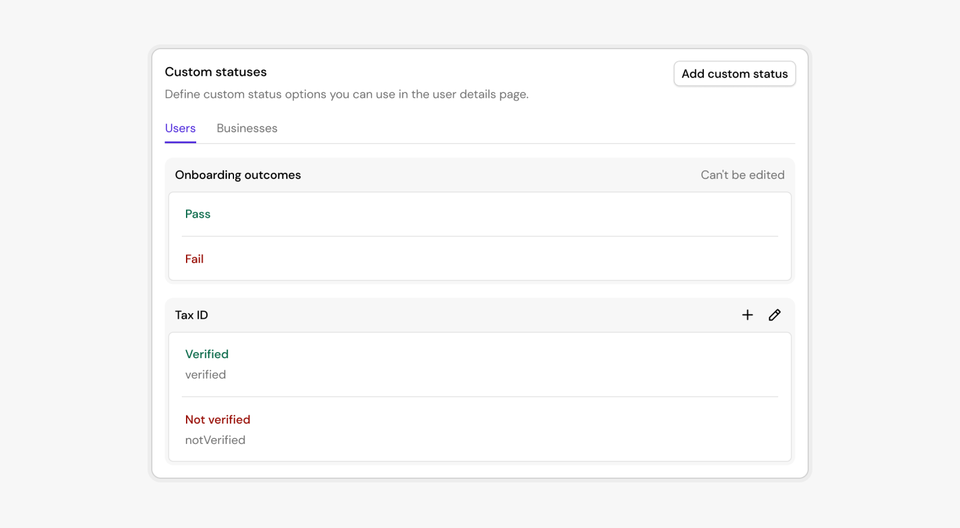
You can now define your own status categories and values directly in Footprint. This gives you complete flexibility to represent business-specific states for users or businesses, far beyond the built-in KYC/KYB outcomes.
What are custom statuses?
Custom statuses are customer-defined status attached to an entity (user or business). They let you encode long-lived, domain-specific state such as:
- Tax ID verification status
- KYC/KYB review state
- Compliance escalation flags
- Internal classification or routing states
How they work
Each custom status:
- Belongs to a category (for example:
Tax ID) - Holds one value at a time (such as
verified,notVerified) - Has a permanent slug for use in integrations and workflows
- Is fully audited, with Footprint maintaining an append-only log of all changes
Where you can use them
Custom statuses appear throughout Footprint:
- In Playbooks, via action nodes that set or clear statuses
- In the User / Business details page, where reviewers can update them manually
- In APIs and automations, via slugs that never change
Why this matters
This release lets teams bring their own business logic into Footprint without engineering work. You get:
- Clear visibility into state
- Consistent logic across workflows
- Clean audit trails for compliance
- A scalable way to track complex verification processes
Learn more in our docs.